Build your 2026 Roadmap in minutes.
The simplest Gantt chart tool for product managers, dev teams, and founders. Plan projects, set priorities, and export to CSV without bulky software.
Why use Roadmap Planner?
Designed for speed and simplicity. No "Jira fatigue".
Privacy First
Your data never leaves your browser. We don't store your roadmaps on any server. Everything is local.
Instant Start
No sign-up forms, no credit cards, no "free trials". Just open the page and start typing your plan.
Excel / CSV Friendly
Import your existing backlog from CSV. Export your finished roadmap to share with stakeholders.
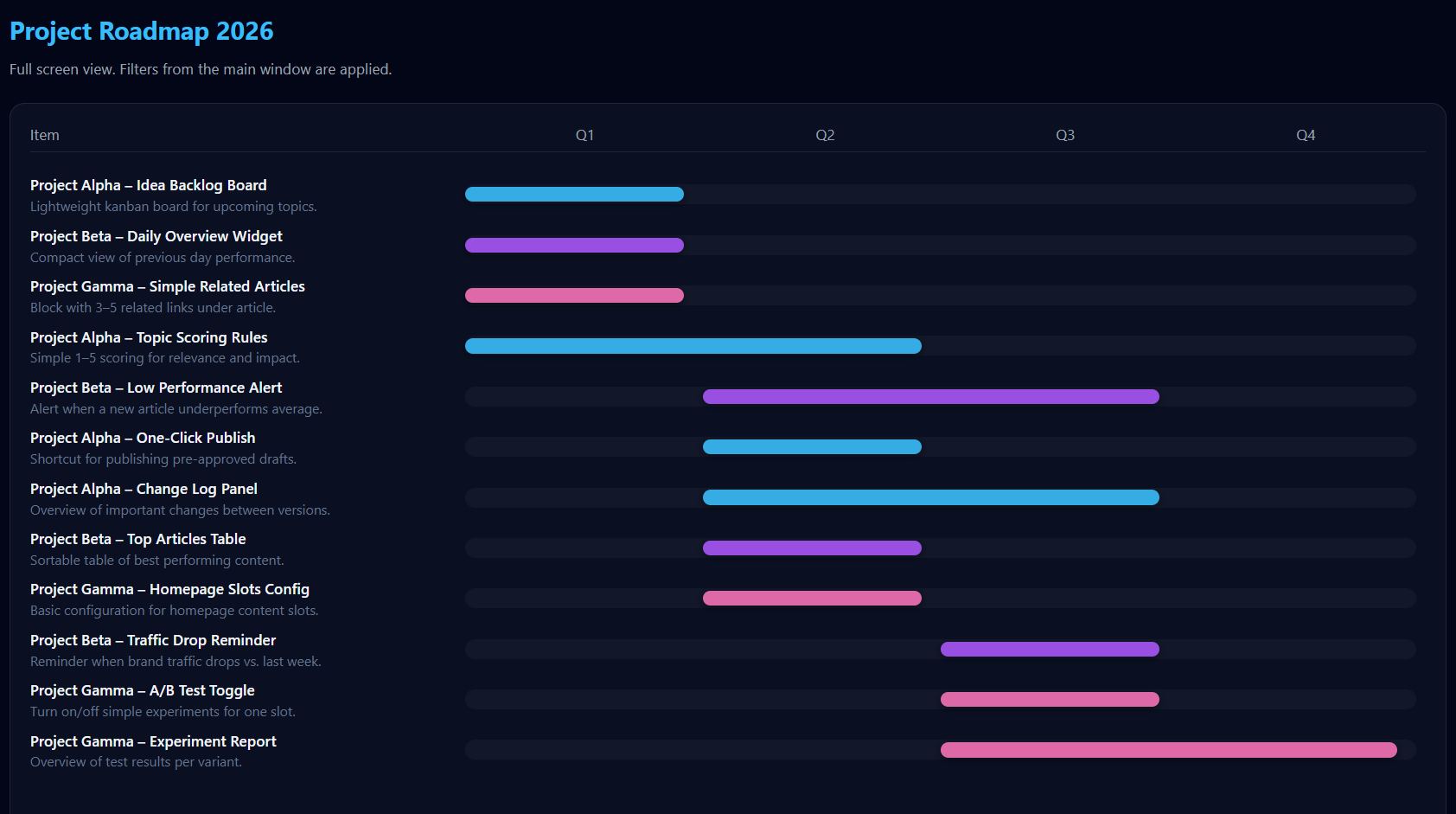
Quarterly Gantt
Visualize Q1-Q4 delivery instantly. See the big picture without getting lost in daily tasks.
Structured Planning
Organize by Project > Subproject > Feature. Set priorities (1-5) and estimate effort points.
Presentation Mode
Open the Gantt chart in a dedicated full-screen window perfect for team meetings and screen sharing.
From idea to roadmap in 4 steps
Define Projects
Create your main pillars (e.g. "AI Core", "Mobile App").
Add Features
Break it down into subprojects and specific features.
Prioritize
Assign Priority (1-5) and delivery quarters (Q1-Q4).
Export
Download the CSV file to save your work or share it.
Frequently Asked Questions
Is this tool really free?
Yes, completely free. There are no hidden costs, no premium features, and no credit card required. We built this as an internal tool for our own quarterly planning and decided to share it with the product management community.
How do I save my data?
Important: Since we don't use servers, you must use the "Export CSV" button to save your work to your computer. You can load it back anytime using "Import CSV". We recommend exporting frequently (every 15-30 minutes) to avoid data loss.
Can I collaborate with my team?
There is no real-time collaboration (Google Docs style) because we don't store data on servers. We recommend screen sharing during planning sessions, then exporting the final CSV to share with your team via email or Slack.
Does it work offline?
Yes! Once the page is loaded in your browser, you can disconnect from the internet and continue planning. All functionality works offline because the tool runs entirely in your browser.
Where is my data stored?
Your roadmap data is stored exclusively in your browser's memory (RAM) while you're using the tool. It is never sent to our servers. When you close the browser tab, the data is gone (unless you export to CSV first). This ensures maximum privacy for your confidential roadmaps.
What browsers are supported?
Roadmap Planner works on all modern browsers: Chrome, Firefox, Safari, and Edge. We recommend using the latest version of your browser for the best experience. Internet Explorer is not supported.
Can I import data from other tools?
Yes! If you can export data from your current tool (JIRA, Asana, Linear, etc.) to CSV or Excel, you can import it into Roadmap Planner. You'll need to match our CSV format: Project, Subproject, Feature, Priority, Effort, Quarter. See our documentation for the exact format.
How does the automatic prioritization work?
Roadmap Planner uses a composite scoring system that combines project priority, subproject priority, feature priority, and effort weight. Lower scores rank higher. The top 25% of features are assigned to Q1, the next 25% to Q2, and so on. You can always override this by manually setting quarters.
What if I accidentally close the browser?
Unfortunately, if you didn't export to CSV before closing, your data is lost. The tool does show a warning if you try to close the tab with unsaved data. We strongly recommend exporting frequently as a safety measure.
Can I use this for agile/scrum planning?
Yes! While Roadmap Planner is designed for quarterly planning, many teams use it for sprint planning by treating quarters as sprints. The hierarchical structure (projects > subprojects > features) maps well to epics > stories > tasks.
How do I share my roadmap with stakeholders?
Export your roadmap to CSV and share the file via email or Slack. Stakeholders can open it in Excel or Google Sheets. Alternatively, use the full-screen Gantt chart view for presentations and take a screenshot or use screen sharing.
Can I customize the quarters or use different time periods?
Currently, Roadmap Planner uses fixed quarters (Q1-Q4). We're working on adding support for custom time periods (months, weeks, or custom date ranges) based on user feedback. Join our Discord to vote on this feature.
What's the maximum number of features I can add?
There's no hard limit, but performance may slow down with 500+ features depending on your computer. For very large roadmaps, we recommend splitting them into multiple CSV files (e.g., one per team or product area).
Do you offer customer support?
Yes! Email us at roadmapplannerapp@gmail.com or join our Discord community for help. We typically respond within 24 hours.
Can I suggest new features or report bugs?
Absolutely! We welcome feedback and feature requests. You can email us, post in our Discord, or open an issue on our roadmap (yes, we use our own tool to plan Roadmap Planner's development).
Is there a mobile app?
Not yet, but the web app works on mobile browsers. The interface is optimized for desktop use during planning sessions. A dedicated mobile app for viewing (not editing) roadmaps is on our roadmap for late 2026.
How do you make money if it's free?
We keep costs near zero by not running servers or databases. The site is supported by optional donations from users who find value in the tool, and unobtrusive ads. If you'd like to support development, you can buy us a coffee.
Will this tool always be free?
Yes. We're committed to keeping Roadmap Planner free forever. No paywalls, no feature limits, no "free trials" that expire. If we ever add premium features (like team collaboration), the core tool will remain free.
Can I use this for personal projects or non-work planning?
Of course! While designed for product roadmaps, many people use Roadmap Planner for personal project planning, side hustles, content calendars, event planning, and more. The hierarchical structure works for any type of goal-oriented planning.
What makes this different from JIRA, Asana, or Monday.com?
Roadmap Planner is purpose-built for quarterly, high-level roadmapping. Unlike task management tools, we focus on strategic planning with automatic prioritization and simple Gantt visualization. We're also privacy-first (no servers), completely free, and designed for speed (open and start planning in seconds).